home |
electronics |
toolbox |
science club |
tuxtalk |
photos |
e-cards |
online-shop

December 2026
Optimizing Linux for older computer hardware: thinkpad x301
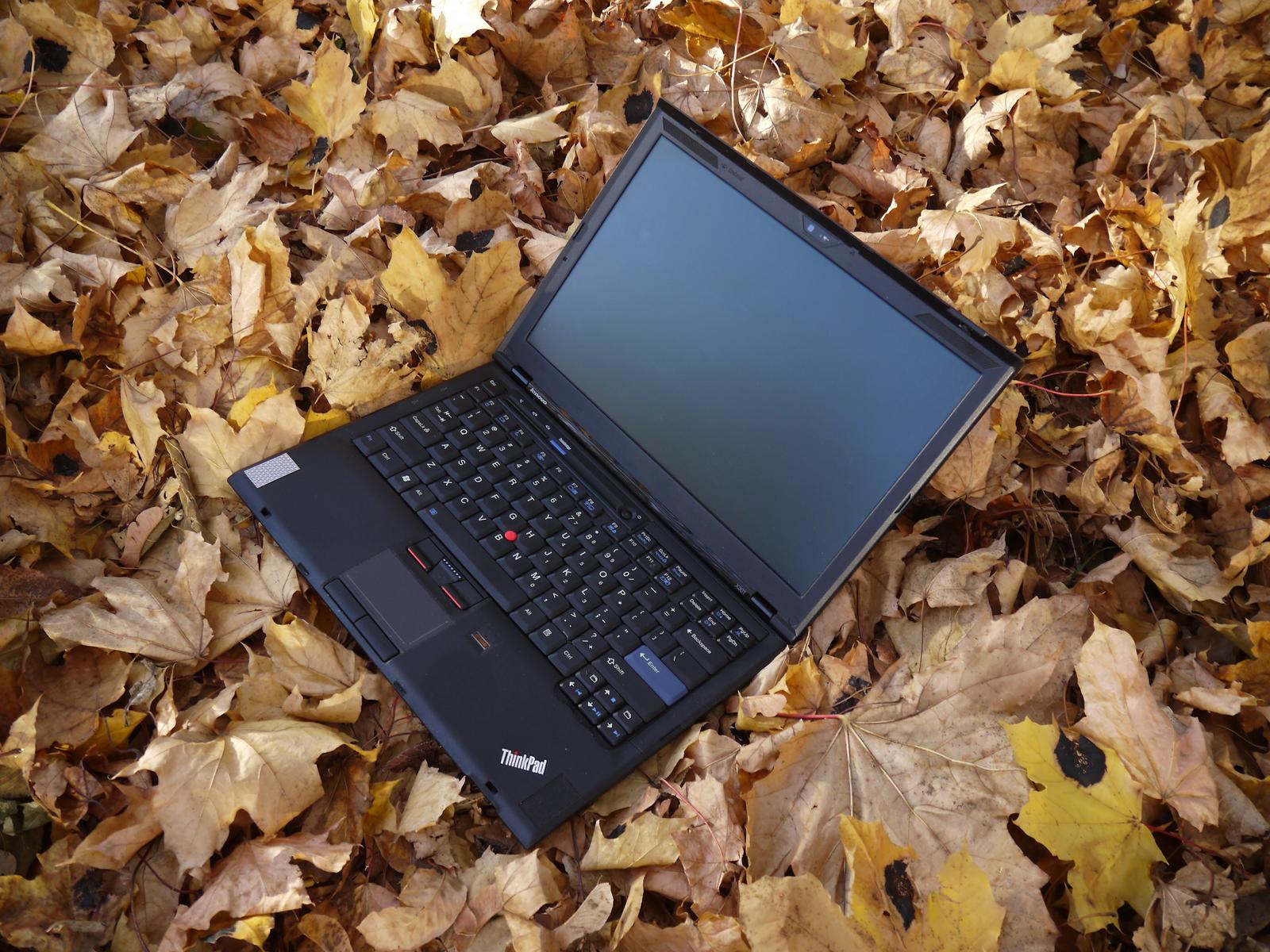
My thinkpad x301 in 2026. I bought this computer in June of 2009 and I still use it.
Linux is a very flexible operating system and it is possible to make it run fast on older hardware. The choice of the linux distribution is not the only factor. It's important to run a simple lean desktop and reduce the amount of processes that run in the background. Often standard distributions run some services for no reason other than "this is our standard setup" and you don't actually use it. The linux kernel has a number of command line parameters that can help to make it faster.
I have been using the Xfce4 desktop for many years and I like it. It's a good user interface. I am using therefore
xubuntu 26.04 to upgrade my laptop. Originally I installed in 2009 gentoo on this thinkpad x301. You can find a description about this initial installation here. In 2017 I decided then to install xubuntu 16.04. After 10 year of xubuntu 16.04 I am finding that I need to upgrade because
it's very hard to find a modern web browser that still runs stable on ubuntu 16.04.
The thinkpad x301 has a Intel Core2 Duo CPU and I upgraded RAM to a maximum of 8GB.
$ lscpu
Architecture:                x86_64
  CPU op-mode(s):            32-bit, 64-bit
  Address sizes:             36 bits physical, 48 bits virtual
  Byte Order:                Little Endian
CPU(s):                      2
  On-line CPU(s) list:       0,1
Vendor ID:                   GenuineIntel
  Model name:                Intel(R) Core(TM)2 Duo CPU     U9400  @ 1.40GHz
    CPU family:              6
    Model:                   23
    Thread(s) per core:      1
    Core(s) per socket:      2
    Socket(s):               1
    Stepping:                6
    Frequency boost:         enabled
    CPU(s) scaling MHz:      57%
    CPU max MHz:             1401.0000
    CPU min MHz:             800.0000
    BogoMIPS:                2792.84
    Flags:                   fpu vme de pse tsc msr pae mce cx8 apic sep mtrr pge mca cmov pat pse36 clflush dts acpi m
                             mx fxsr sse sse2 ht tm pbe syscall nx lm constant_tsc arch_perfmon pebs bts nopl cpuid ape
                             rfmperf pni dtes64 monitor ds_cpl smx est tm2 ssse3 cx16 xtpr pdcm sse4_1 lahf_lm dtherm i
                             da
Caches (sum of all):
  L1d:                       64 KiB (2 instances)
  L1i:                       64 KiB (2 instances)
  L2:                        3 MiB (1 instance)
NUMA:
  NUMA node(s):              1
  NUMA node0 CPU(s):         0,1
The laptop still had the original 128GB SAMSUNG 1.8" ssd prior to the xubuntu 26.04 upgrade but I have upgraded it now
to a 256G disk using a msta to 1.8" sata disk adapter board. It's almost impossible to buy 1.8" sata disks in 2026 but
adapter cards are a good choice. I built my own case for this disk using milk carton. Milk carton is actually a very durable material and it's easy to work with. With this cardboard case attached to the adapter the disk slides
easily into the thinkpad x301 disk bay and holds reliably.
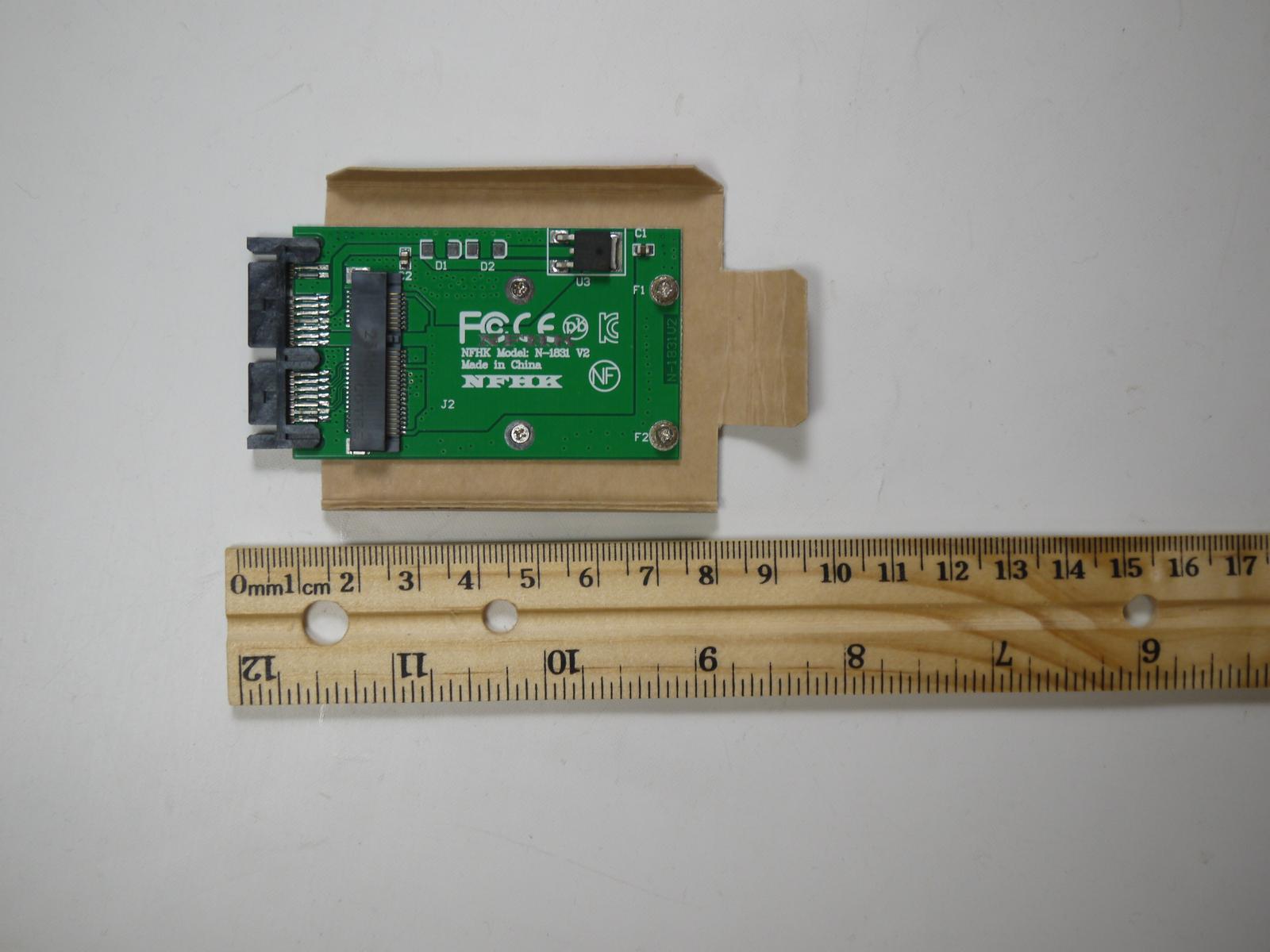
msata to 1.8 inch sata disk adapter made from milk carton. The screws to attach the adapter to the cardboard are short countersink M2 screws (2mm metric screws).
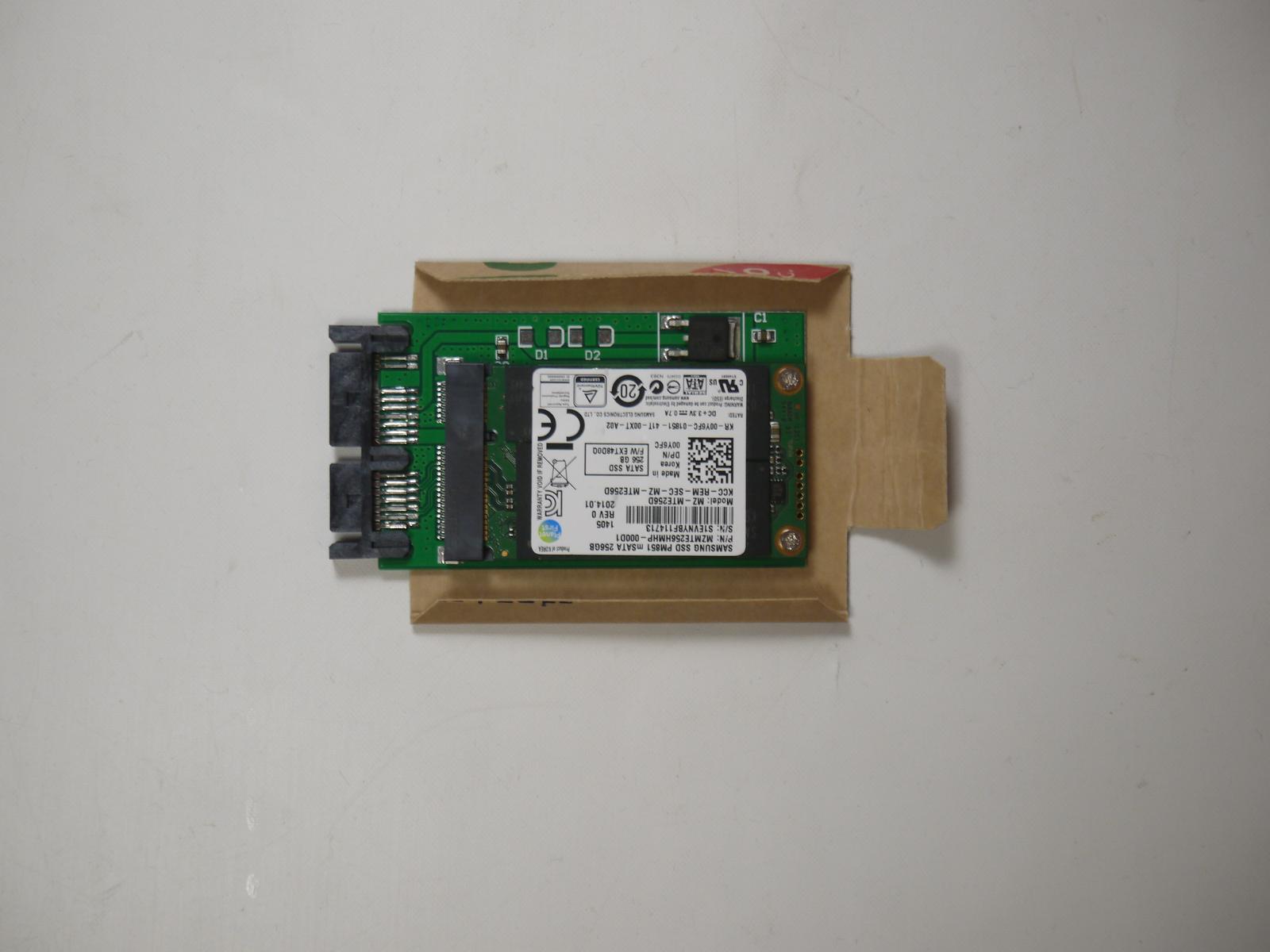
msata to 1.8 inch sata disk adapter made from milk carton
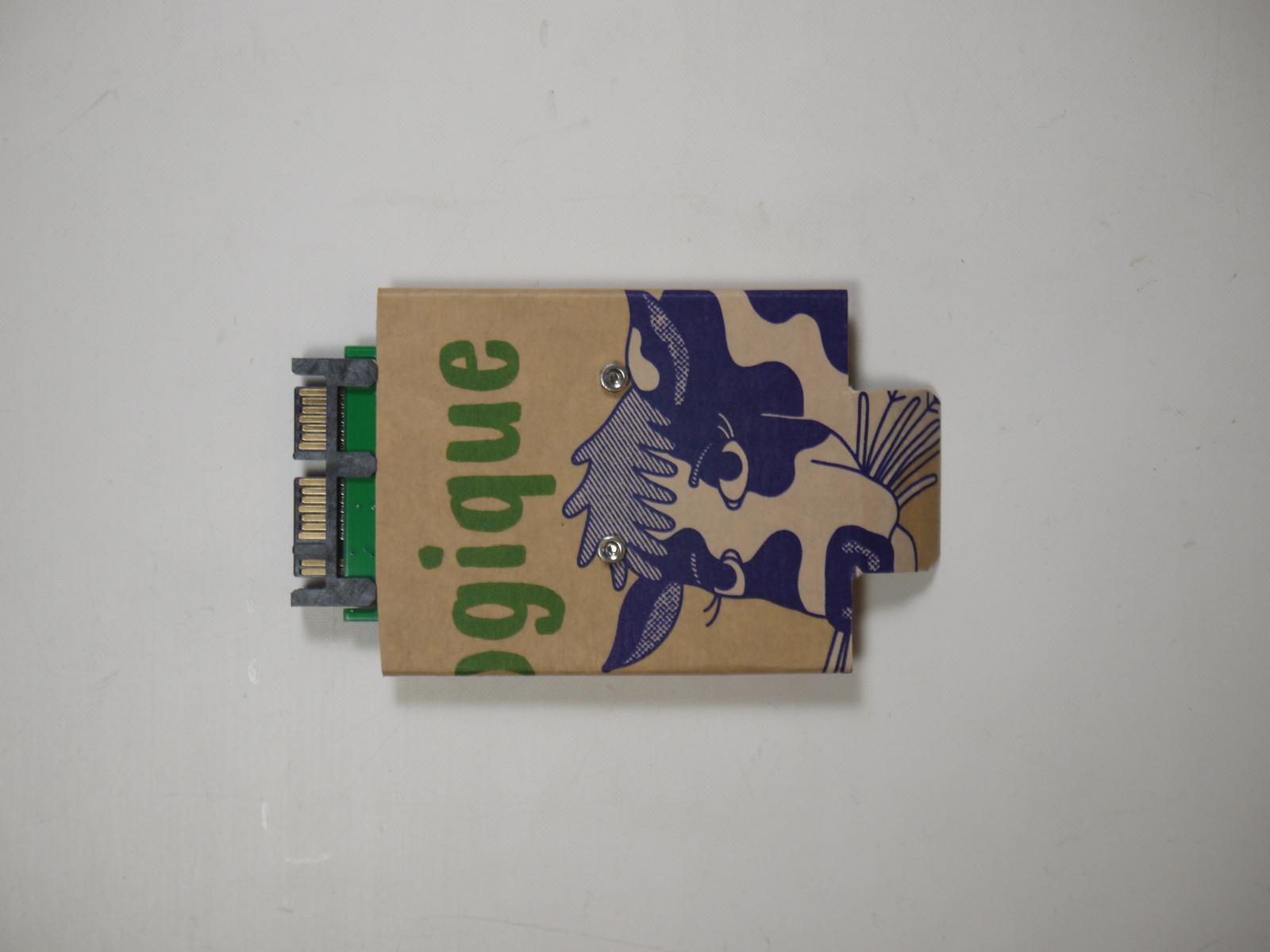
back view: msata to 1.8 inch sata disk adapter made from milk carton
This "cardboard case" looks cheap but it's really good and durable.
Kernel optimizations
There are a number of bugs in older CPUs that activate kernel code to mitigate them however for a personal computer running at
home behind a wifi router that acts as a firewall these mitigations are really just overhead. There are also features that are not required and slow down the computer. The linux kernel can be configured via kernel command line parameters. You can find a description of these parameters at https://www.kernel.org/doc/Documentation/admin-guide/kernel-parameters.txt or kernel-parameters.txt, local copy, status Oct, 2026.
I use the following kernel command line parameters for my x301. It makes for very significant speed improvements compared to stock xubuntu:
GRUB_CMDLINE_LINUX_DEFAULT="mitigations=off ipv6.disable=1 audit=0 apparmor=0 selinux=0 mce=off initcall_blacklist=tpm_tis_init,tpm_init"
These "flags" are set in the file /etc/default/grub and you run the command update-grub to make sure that the changes
are taking effect at the next reboot.
Here is what my settings do:
- mitigations=off: Shorthand that disables all CPU bug mitigations (Spectre, Meltdown, MDS, L1TF, etc.) simultaneously. This replaces nopti nospectre_v1 etc., ensuring maximum pipeline throughput and execution speed.
- ipv6.disable=1: disable IPv6 support. The actual internet is on IPv4 not IPv6. IPv6 is mainly used for the backbone infrastructure.
- selinux=0: Ubuntu does not use SELinux and this removes overhead.
- apparmor=0: This restricts program's capabilities using per-application security profiles and I don't use it. Standard linux permissions are enough.
- mce=off: Disables the Machine Check Exception subsystem. The kernel will no longer actively check for corrected hardware errors, saving slight computational overhead (do not use if you suspect your RAM is physically failing).
- initcall_blacklist=tpm_tis_init,tpm_init: This disables the use of the TPM chip and saves some time during boot-up. The TPM is of no use if you run a standard xubuntu install with no disk encryption.
- audit=0: Turns off kernel auditing. Prevents the kernel from initializing and queuing audit-related events, messages, and netlink sockets right from startup.
You can use
dmesg | grep -i "command line"
to check that you have no spelling errors in the command line parameters. These parameters may also change
dependent on kernel version.
To benchmark performance improvements you can use e.g
systemd-analyze time
However be aware that you might need to optimize your startup first because there could be timeouts and wait periods in there and they will distort the measurement. Do also a few reboots before you conclude anything because there may be some variability.
No disk writes when just reading files
Linux can keep track of when files were last read. This is called "atime" but it comes with a performance hit because it will cause disk write operations when you are just reading files. Booting or starting some software is mostly reading files and if this becomes actually just reading over the sata bus then you can save a lot of time. Set the mount flag "noatime" in /etc/fstab. Like this:
# <file system> <mount point>   <type>  <options>       <dump>  <pass>
/dev/disk/by-uuid/f660f973-b03c-40ef-a0f3-72a21dba7cb5 none swap sw 0 0
# / was on /dev/sda4 during curtin installation
/dev/disk/by-uuid/b8a709e3-9e35-4ac2-9360-61653fba41d6 / ext4 defaults,noatime 0 1
# /boot was on /dev/sda1 during curtin installation
/dev/disk/by-uuid/1a564759-388f-4d28-a31a-53ac5a7a0ae0 /boot ext4 defaults,noatime 0 1
Install the max amount of memory
You can easily swap SODIMM memory modules on the X301. Install the maximum possible (8GB).
Avoid snap applications
Snap is a terribly inefficient system. The advantage is that you can install recent software on very old linux
distributions. This is how I was able to run a recent version of firefox on ubuntu 16.04 prior to the installation
of the new ubuntu 26.04. Snap has it's uses but it comes at a heavy performance cost.
For a new ubuntu install you delete all snap installations and you try to install them directly on the operating system. Example:
snap remove --purge firefox
and then go to mozilla.com to download firefox and install it manually in /opt or /usr/local.
Web browser options
Web browsers have become fat. They are by far the heaviest work loads on a computer. Here are a few things
that I use:
- Make sure you get an ad-blocker. I use ublock origin. I install also in firefox also "Javascript switcher" and "Nuke Anything". It's a good idea to avoid web sites that are filled with heavy advertisements.
- Try alternative web browsers such as
- librewolf
- opera
- palemoon
- falkon
I like falkon a lot but some web sites like the Canadian bank tangerine.ca don't work with it. Ironically tangerine.ca is an internent bank and you would think that they know how to make good and lean web sites. They don't. They have one of the worst web interfaces when it comes to compatibilty with different browsers. Opera works fine for tangerine.ca.
Efficient office applications
Take a look at https://getartcraft.com/
Optimize systemd, booting
Removing unnecessary things from the startup of your computer does not only improve startup times but also overall
performance because any process that is there for no reason is still consuming resources.
Here is how to go about diabling services that you don't need.
- Review what is running: systemctl list-unit-files
- Find out what a given service does: systemctl show service.name | grep Description
If the service has no good description or it does not mean anything to you then you can also ask google.
- To disable a normal service: systemctl disable service.name
- To disable a static service: systemctl mask service.name
After this you reboot and you check that everything is still working. Once you have disabled stuff that looks like it should not be there you use
systemd-analyze blame| head
to find bottlenecks in the startup. Maybe there is something which can be improved further.
Services that I disable
- whoopsie.*: this is to deal with crash reports under /var/crash. Not needed.
- apparmor.service: you can disable this if you have it also disabled in the kernel (see command line parameters)
- cups.*: I have a print server and I configure everything there. The clients just use /etc/cups/client.conf to
connect to this server. No need to run any print service detection locally.
- brltty.*: if you are not blind then you don't need it.
- ModemManager.service: only if you have wwlan card and a sim card in your laptop
- ppp@.service: same as ModemManager.service
- openvpn-*: not needed
- ubuntu-advantage.service: not needed
- avahi-daemon.service: not needed in a linux network
- cryptdisks*: only if you use disk encryption
- apport.*: automatic crash reports
- saned*: for scanner connections
- update-notifier*: not needed. I decided when to update.
Thinkpad rubberized paint becoming sticky
The thinkpad x301 has rubberized paint on the palm-rest. This gives it a nice texture and feel for the first 10 years
but this paint is not stable. It degrades in the presence of oils from hand creams or just general use. It becomes
a sticky goo.
New thinkpads have this paint maybe on the lid but never on the palm rest. It's the palm rest where it is most problematic.
Some people recommend to reduce the amount of stickiness by wiping the palm-rest with isopropyl alcohol. In general
you have to be very careful with solvents around plastic parts. It may make things worse. The occasional application
of isopropyl alcohol is OK for the ABS plastic body but it does not actually solve the problem. It dissolves
some of the more degraded rubber molecules but over all the rubber will just keep degrading.
The solution is to install a pre-cut vinyl laptop skin sticker on the palm rest. There are some sellers on aliexpess.com who sell pre-cut stickers for the X301 thinkpad. Get the black mate type of sticker. Vinyl is a stable
plastic that does not degrade. Most of these sticker sellers produce stickers to decorate the laptop lid. Its not needed there. The rubberized paint is fine on the lid. Rubberized coating degrades in the area where your hands rest all day long.
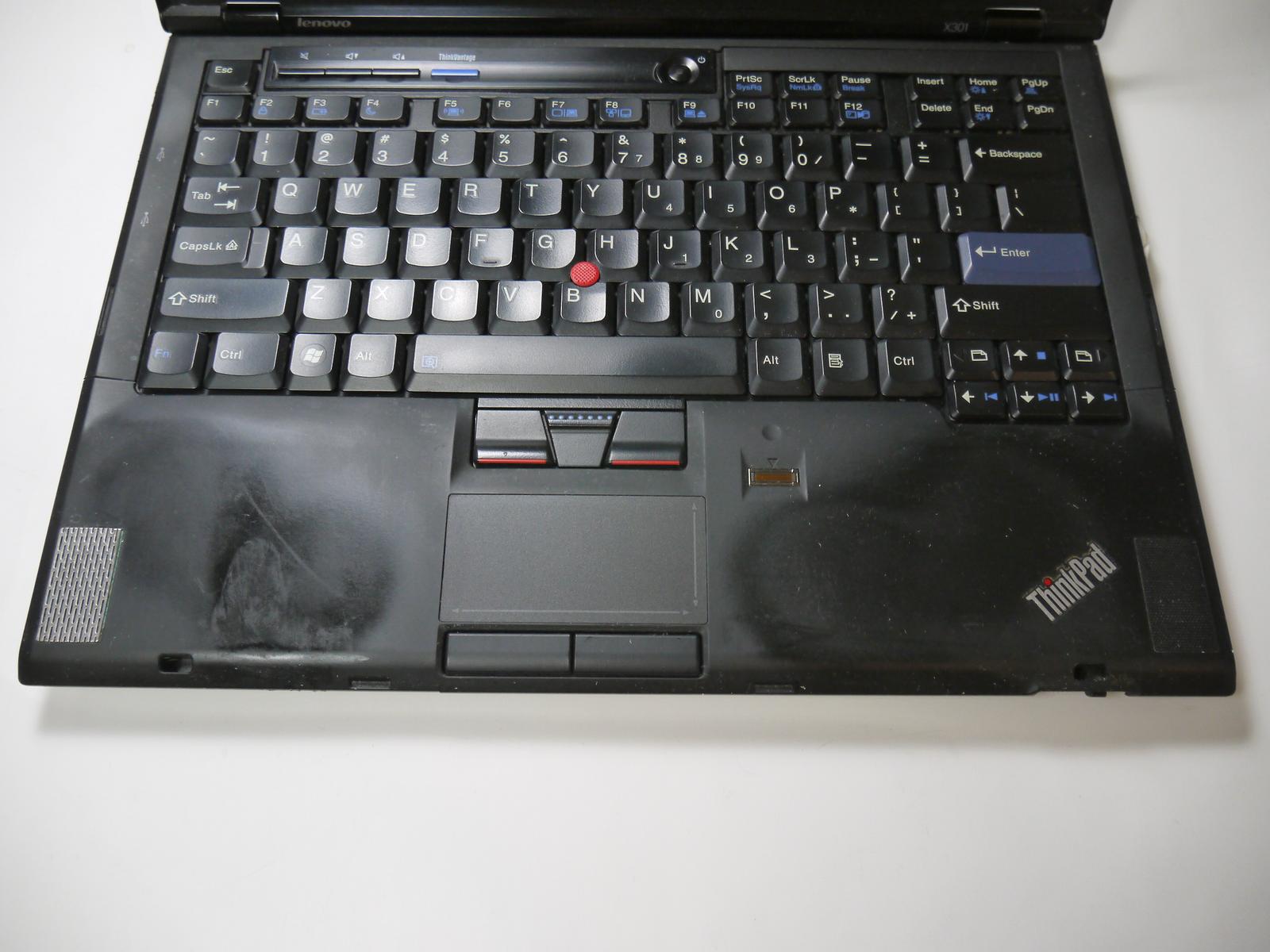
Thinkpad rubberized paint on the palm rest of the X301. This paint is 17 years old and sticky.
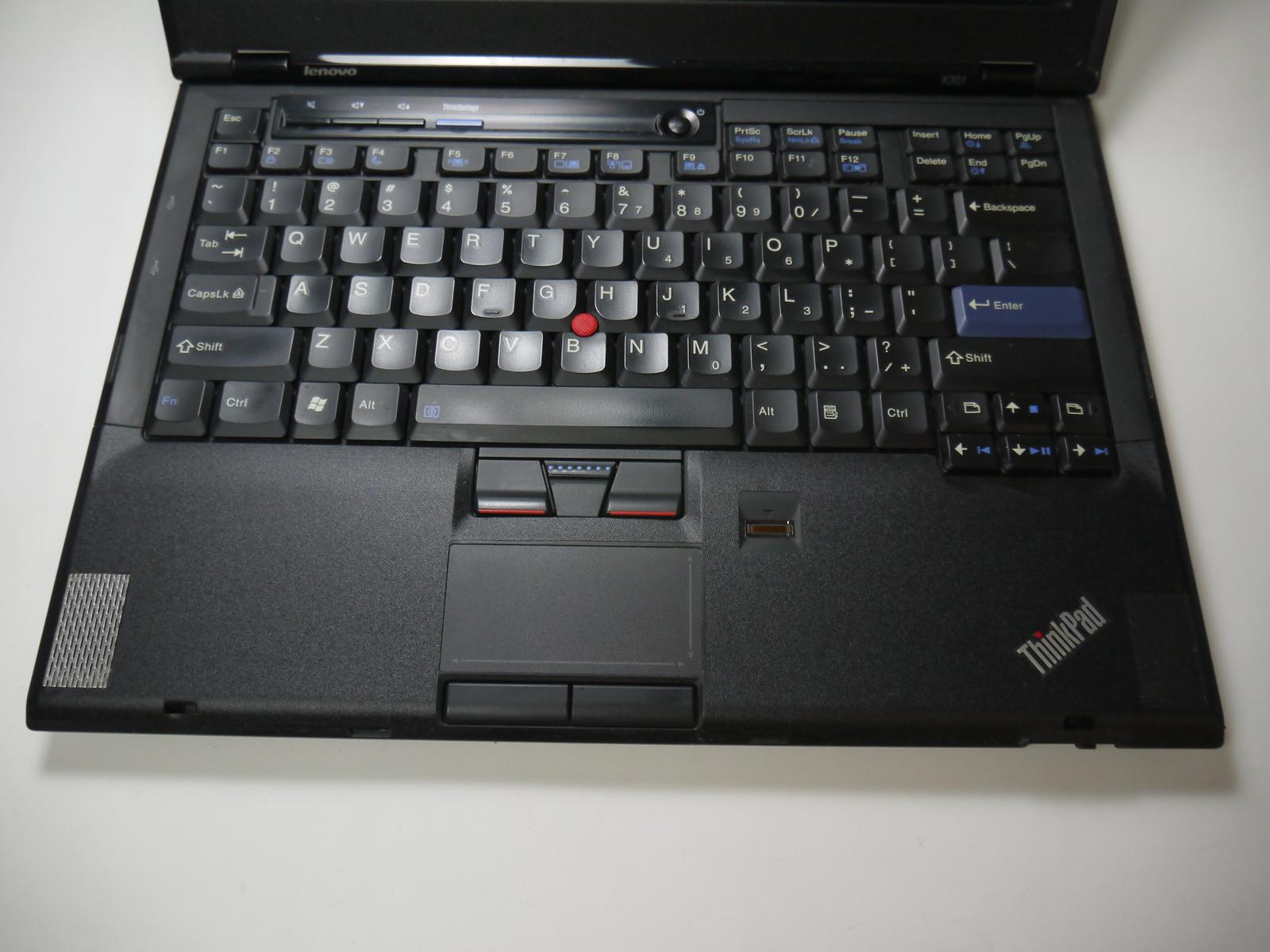
Black vinyl skin on the palm rest of the X301
The left speaker on the thinkpad X301
The X301 is mechanically quite good but it has a small design flaw. If you are a man with a normal hand size then your hand will usually rest on the left speaker cover and this
causes the plastic screen to break after just a few month. The best solution is to install a stainless steel speaker cover which can handle the weight of your palm. I have used some stainless steel cover with fine slots from a local hardware store but if you can not find something like this then take a stainless steel espresso machine filter. They are widely available.
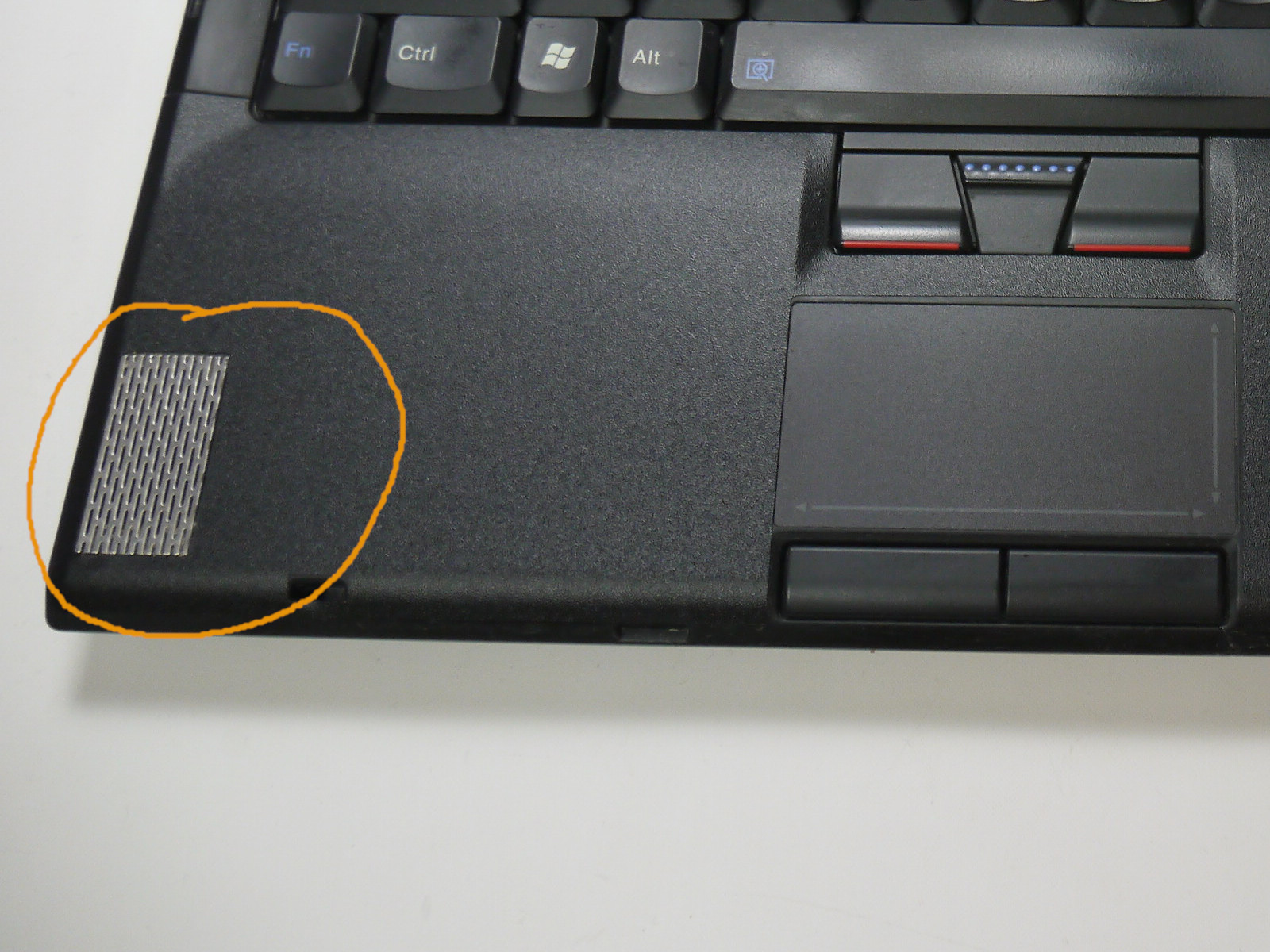
The left speaker cover breaks usually on the X301 because it is quite close to your palm. The solution is to install a metal cover that can handle the weight of your hand.
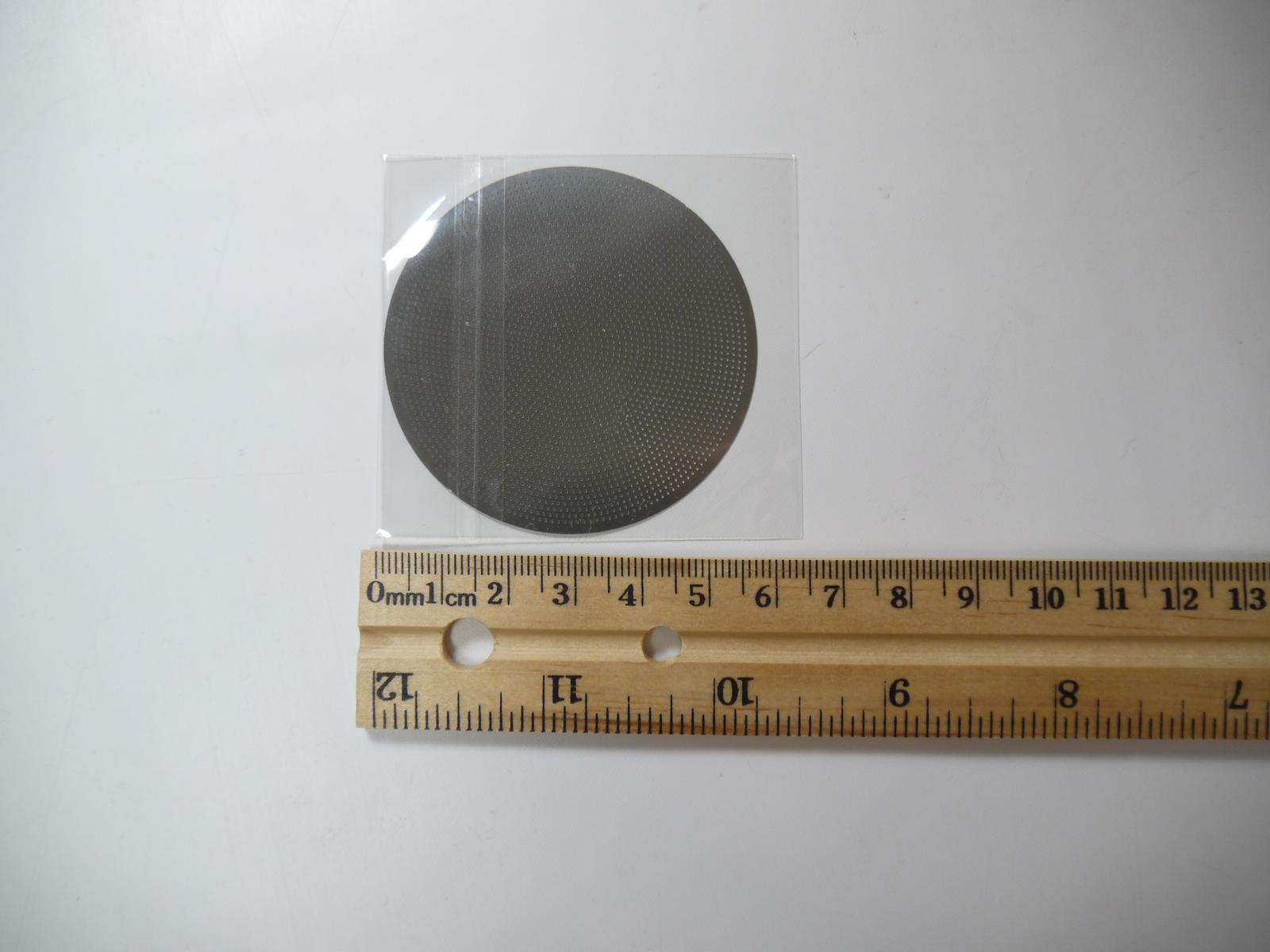
Stainless steel espresso machine filters are a viable option for the speaker cover. They are easy to get.
Disable mouse support in vim
I live in shell and on the command line. My favorite editor is vim. The problem is that "mouse support" has creeped into this editor over the years and it's on by default. This is terrible if you want to have an efficient workflow. The mouse is for selecting text and copying it not for moving or scrolling in vim. Vim has an insert mode and a separate command mode for a reason. Here is a section of my .vimrc file to fix this (it's not just the "set mouse=" that is needed to disable mouse support but also "set t_ti= t_te="):
" Startup file for vim editor
" written by Guido Socher
"
version 4.0
set ignorecase
set ruler
set showmatch
set visualbell
set nowrapscan
"incremental search is really cool! You terminate it with return
set incsearch
" some keyboards have the F1 key where the Esc key is expected:
map <F1> <ESC>
imap <F1> <ESC>
"disable mouse support:
set mouse=
set ttymouse=
"disable mouse wheel scroll support:
set t_ti= t_te=
"disable system clipboard
set clipboard=
" end of .vimrc file
Wake-up form suspend to ram hangs
The thinkpad x301 uses acpi s3 to perform suspend to ram and the bios code involved here may have some bugs. The older linux 4.4.0 kernel from ubuntu 16.04 had probably some code to deal with strange acpi implementations. Suspend to ram and wake-up was working fine out of the box with xubuntu 16.04. With xubuntu 26.04 and linux kernel 7.0.0-31-generic or 7.0.0-38-generic there is a 90 second delay at wake-up from suspend to ram:
output of dmesg:

[ 6706.424034] ACPI: PM: Low-level resume complete
[ 6706.424034] ACPI: EC: EC started
[ 6706.424034] ACPI: PM: Restoring platform NVS memory
[ 6706.424034] Enabling non-boot CPUs ...
[ 6706.424034] smpboot: Booting Node 0 Processor 1 APIC 0x1
[ 6706.421351] Disabled fast string operations
[ 6707.474989] workqueue: psi_avgs_work hogged CPU for >20000us 4 times, consider switching to WQ_UNBOUND
[ 6708.001068] workqueue: psi_avgs_work hogged CPU for >20000us 5 times, consider switching to WQ_UNBOUND
[ 6708.264701] workqueue: psi_avgs_work hogged CPU for >20000us 7 times, consider switching to WQ_UNBOUND
[ 6709.588423] perf: interrupt took too long (10556 > 9778), lowering kernel.perf_event_max_sample_rate to 18000
[ 6711.449706] workqueue: psi_avgs_work hogged CPU for >20000us 11 times, consider switching to WQ_UNBOUND
[ 6714.202394] perf: interrupt took too long (13568 > 13195), lowering kernel.perf_event_max_sample_rate to 14000
[ 6719.590906] perf: interrupt took too long (17847 > 16960), lowering kernel.perf_event_max_sample_rate to 11000
[ 6722.962961] workqueue: psi_avgs_work hogged CPU for >20000us 19 times, consider switching to WQ_UNBOUND
[ 6726.516017] perf: interrupt took too long (22923 > 22308), lowering kernel.perf_event_max_sample_rate to 8000
[ 6736.517920] perf: interrupt took too long (29555 > 28653), lowering kernel.perf_event_max_sample_rate to 6000
[ 6746.343010] workqueue: psi_avgs_work hogged CPU for >20000us 35 times, consider switching to WQ_UNBOUND
[ 6749.593206] perf: interrupt took too long (37452 > 36943), lowering kernel.perf_event_max_sample_rate to 5000
[ 6758.656165] hrtimer: interrupt took 2635506 ns
[ 6766.520961] perf: interrupt took too long (47408 > 46815), lowering kernel.perf_event_max_sample_rate to 4000
[ 6768.497959] workqueue: psi_avgs_work hogged CPU for >20000us 67 times, consider switching to WQ_UNBOUND
[ 6791.135414] perf: interrupt took too long (59658 > 59260), lowering kernel.perf_event_max_sample_rate to 3000
[ 6796.184058] CPU1 is up
[ 6796.190707] ACPI: PM: Waking up from system sleep state S3
[ 6796.208741] ACPI: EC: interrupt unblocked
[ 6796.213158] usb usb8: root hub lost power or was reset
[ 6796.213386] usb usb2: root hub lost power or was reset
[ 6796.213662] usb usb3: root hub lost power or was reset
[ 6796.213825] usb usb5: root hub lost power or was reset
[ 6796.214787] ACPI: EC: event unblocked
The best solution is to use a systemd script which takes CPU1 offline before suspend and brings it back after suspend:
$ cat /usr/lib/systemd/system/disable-cpu1-sleep.service

#  disable-cpu1-sleep.service
#
# the thinkpad x301 has maybe some bios bugs that cause problematic ACPI power state transitions
# and this systemd script workaround fixes a delay that happens on wake-up from suspend to ram
#
# How to install it:
#  cp disable-cpu1-sleep.service /lib/systemd/system/disable-cpu1-sleep.service
#  systemctl enable disable-cpu1-sleep.service
#  systemctl start disable-cpu1-sleep.service
#  systemctl status disable-cpu1-sleep.service
#

[Unit]
Description=Disable CPU1 before suspend to ram and re-enable it on wake
Before=sleep.target
StopWhenUnneeded=yes

[Service]
Type=oneshot
# the RemainAfterExit is a trick to make systemd think that the service is running while the computer is going to sleep
# this causes "systemctl status disable-cpu1-sleep.service" to show "Active: inactive (dead)" but that is not a big deal
RemainAfterExit=yes
ExecStart=/bin/sh -c 'echo 0 > /sys/devices/system/cpu/cpu1/online'
ExecStop=/bin/sh -c 'echo 1 > /sys/devices/system/cpu/cpu1/online'

[Install]
WantedBy=sleep.target
# end of disable-cpu1-sleep.service
Apart from this everything is working out of the box with xubuntu 26.04 and there are not other workarrounds needed.
Useful links
Back to NPA blog index
© 2004-2026 Guido Socher