Home |  Electronics |  Toolbox |  Gini and Karl's world |  E-cards |  Photos |  Online-Shop

http://tuxgraphics.org/electronics


Content:
By Guido Socher


AVR Wi-Fi

[Illustration]

Abstract:

The tuxgraphics ethernet board can be very useful all over the house to take measurements or for control tasks. Ethernet network cables are however sometimes difficult to add. The solution is wireless: Wi-Fi also known as 102.11a, 102.11g, 102.11n.

How to get tuxgraphics ethernet board in the graden pavilion or cabana connected to the home network using Wi-Fi?

_________________ _________________ _________________


Wi-Fi

It would be possible to connect an AVR microcontroller to a WiFi card. The challenge is however the encryption. There are not only a number of different encryption algorithms but it is as well a challenge to implement all of them in a microcontroller.  

Off the shelf Wi-Fi AP-clients

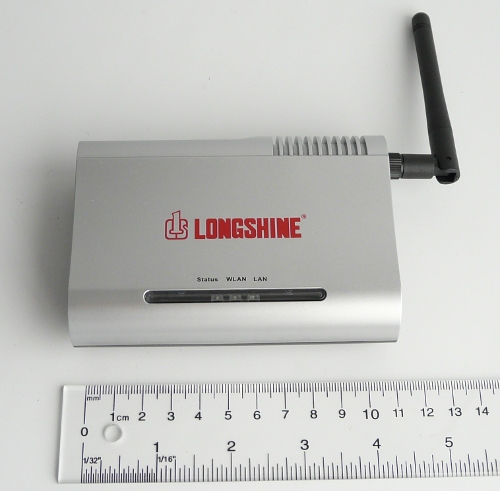
There is a lot of completion in the market for Wi-Fi electronics and all of those devices are mass produced. I bought recently a new Longshine WA-45 WIFI AP-client for 35 dollar. It is an end of life product and there will probably be a new version soon. Older models are sold for such a low price that it becomes impossible to compete with that. The best solution is therefore to use such an off the shelf Wi-Fi AP-client.

You can find a variety of those Wi-Fi AP-clients in any specialized supermarket for computer and electronics. They are usually sold as "Wi-Fi Bridge and Access Point". On the box it will normally say "WIFI Access Point" or "WIFI Bridge" but NOT "WIFI Router". On the back of the box you might see some explanation saying that you need in addition a router to connect to the internet and that this system can be used to connect existing ethernet devices to a wireless network.  

How to use a Wi-Fi AP-client

Those "WIFI Access Points" can normally be configured to work in a couple of different modes: We are after the "AP-Client" mode.

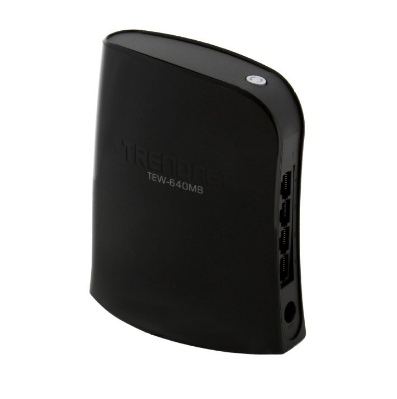
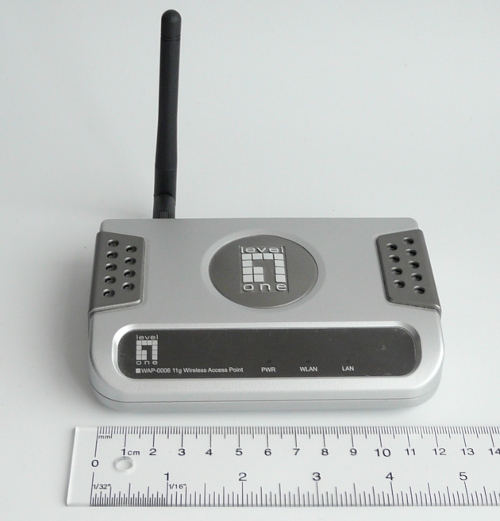
Those "WIFI Access Points" are small boxes with a single ethernet rj45 jack and an antenna. You configure them to connect to a given WIFI network identified by its name (SSID).

Here is how they look like.

Longshine WA-45

Level 1 wap0006

D-LINK DWL-2100A


Wireless Client Configuration

The setup is from a hardware point of view very simple. You just connect the AVR ethernet board to AP-client adapter with a short cable.

The configuration might be a bit more complicated. In most cases you will have to connect in your computer with an ethernet cable and then access a configuration web page at a factory pre-set IP address.


The details depend on the manufacturer but I can give a few tips. You want the Wi-Fi AP-client to be as "dumb" as possible. It should be a "wireless cable" to the AVR ethernet board.

The AP-client configuration should normally require only the following parameters. If the menu system asks for more parameters then you are probably in the wrong mode.
  1. Mode: AP-client.
  2. Band: 802.11 A/G/N, select the band that is compatible with your already existing WIFI network.
  3. ESSID of the AP to connect to. The "name" of your already existing WIFI network.
  4. WLAN MAC: Some AP-clients might requires this and others not. The idea is that there could be bigger WIFI networks with multiple APs and you want to select one of the APs by its MAC address. If this option is needed then go to your already existing WIFI router and check what the MAC address on the WIFI side is.
  5. A page with security and encryption related settings.


Once you think that the configuration is complete I suggest to take a PC, shut down the PCs WIFI interface and connect it to the WIFI AP-client adapter. Check if it gets a new IP address from the DHCP server insider you Wi-Fi Router (not the AP-client) and check on the PC what that address is. Then go to a different PC in the network and ping that address. Connect the tuxgraphics ethernet board once this this test was successful.  

References/Download


© Guido Socher, tuxgraphics.org

2010-06-13, generated by tuxgrparser version 2.57